
Blog
IB learning app: how Photon IB helps you learn, practise and revise
If you are looking for an IB revision app, ask what it does between "here is a question" and "you got it wrong". Photon IB is built the way we teach: a daily plan, one small concept at a time with a diagram that moves, exam-style questions marked step by step, and a Progress page that shows what to fix next. This guide walks through the app with real screens, and shows what to look for in any IB learning app.
By Mr Ejaz (Ejaz Ahmad) and the Photon Academy team · 9 November 2026 · 27 min read
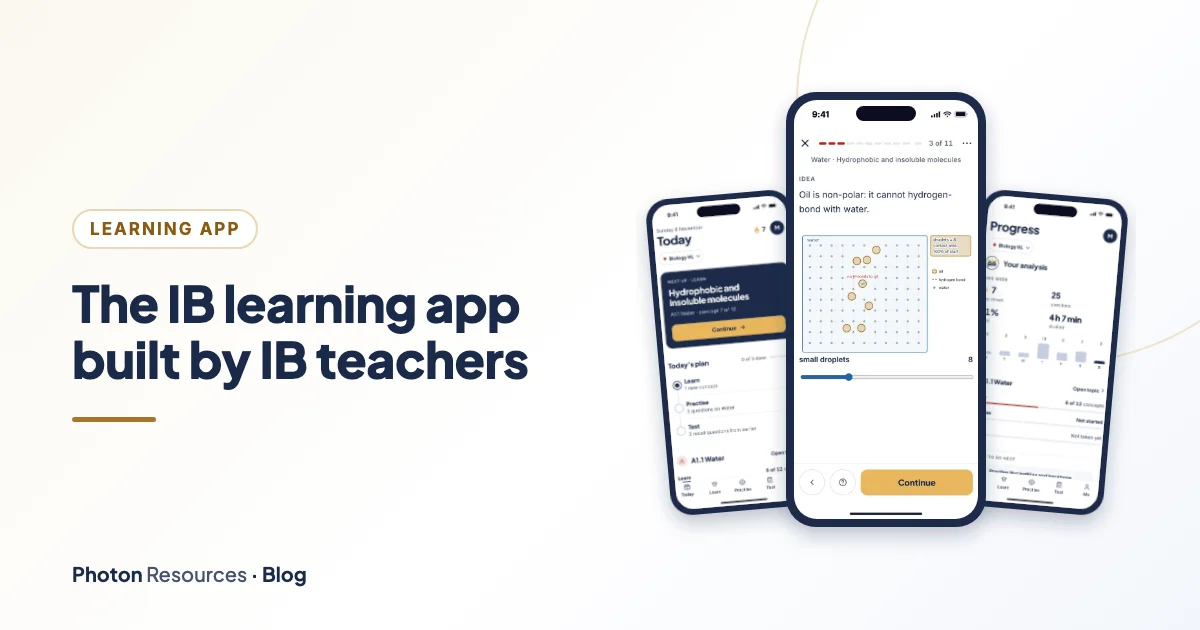
- iPhone, iPad and browser
- Maths AA and AI, Physics, Chemistry, Biology
- HL and SL
- 2 topics free in every course
Every screen in this guide is the real app, shown with a demo student account. No real student's data and no paid questions appear here.
What is Photon IB? The short answer
Short answer
Photon IB is a learning app for IB Diploma Maths, Physics, Chemistry and Biology, at HL and SL, on iPhone and iPad, with the same course in any web browser. Each course is split into topics and small concepts that follow the current IB guide. You learn a concept in a short lesson with a picture that moves, check it with quick questions, practise it with exam-style questions marked part by part, and come back to it later with short recall tests. A Today screen plans your day, and a Progress page shows your streak, accuracy, weakest subtopics and mistakes to review.
It is free to start: two topics in every course are free. A full course unlocks for 12 months with one payment and no renewal.
A note on names, because the same product turns up under three. The App Store lists it as Photon: IB Learning Studio. The icon on your Home Screen says Photon IB. The browser version is called Learning Studio. It is one course and one account, so your courses, Library, e-books and progress are the same everywhere you sign in.
| Question | Answer |
|---|---|
| Where does it run? | iPhone and iPad (with layouts for iPad and iPhone Duo), and any web browser at photonresources.com/learning-studio/app/. |
| Which courses? | IB Maths AA HL and SL, Maths AI HL and SL, Physics HL and SL, Chemistry HL and SL, Biology HL and SL. |
| What does it cost to try? | Nothing. Two topics in every course are free, with lessons, practice, tests and your Progress page. |
| What does a course cost? | One payment for 12 months, no renewal. Either the course, or the course with the Library. See free or paid. |
| Who made it? | The IB-certified teachers of Photon Academy, led by Mr Ejaz, who has taught the IB Diploma since 2015. |
| How do I sign in? | In the app, with Google, Apple or an email code. Your progress is saved to your account and follows you between devices. |
Why we built an IB learning app
Photon Academy has taught the IB Diploma since 2015. Mr Ejaz and the team have taught more than 1,000 IB students, in Singapore and online. Mr Ejaz is IB-certified for Maths AA HL and Physics HL, and he writes the Photon Guidebooks with the team.
Over those years the same three problems kept turning up, whatever the subject and whatever the student's target grade.
- No planWith weeks to go, students still ask "what should I revise today?" and reach for the topic they like best. The topics they avoid are the ones that cost the most marks.
- Practice without feedbackA student can do fifty questions and learn little if nobody shows where the marks were lost. IB papers are marked line by line, so practice has to be too.
- No memoryA topic that felt secure in September has faded by March unless you go back to it. Reading the notes again is the slowest way to bring it back.
Our About page puts the pattern simply: most students who lose marks know the content. They misread the question, stop a line short, or never practised the last-question type. Photon IB is our attempt to fix all three problems in one place, and to do it the way we would in a lesson: explain, check, practise, come back later.
How to choose an IB revision app: eight questions to ask
Most IB revision apps look alike in a store listing. A handful of questions shows the real differences. They apply to any app, ours included, and you can answer most of them in ten minutes on a free trial.
| Ask this | Why it matters | What Photon IB does |
|---|---|---|
| Who wrote the questions? | Questions written by people who teach the course are more likely to match what the exam rewards. | Written by the IB-certified teachers of Photon Academy. They are original, not copies of IB papers. |
| Does it teach, or only test? | A question you cannot start teaches little. The idea has to come before the practice. | Every concept has a short lesson with a moving diagram and quick checks before the exam-style questions. |
| Is it marked the way the exam is marked? | IB marks are earned on lines of working, not only on the final answer. | Questions are marked part by part, with follow-through from earlier parts and mark-scheme steps you tick for written answers. |
| Does it climb from easy to hard? | You learn fastest at the edge of what you can already do. | Five levels: Foundation, Core, Exam, Challenge and Stretch, with Paper 1 and Paper 2 style questions. |
| Does it make you remember? | Rereading feels productive but fades. Recalling from memory, spread over days, lasts. | A daily recall of three questions from concepts you finished a few days ago, plus topic tests. |
| Can you see progress and the next step? | A score alone does not say what to do tomorrow. | A Today plan, a Progress page with weakest subtopics and mistakes to review, and a "What to do next" card. |
| Does it match your course and level? | HL and SL, AA and AI, and the newer science guides all differ. | Ten courses, each following the current IB guide for that subject and level. |
| Can you try it free, and is the price clear? | You should see the quality before you pay, and know when access ends. | Two topics in every course are free. A course is 12 months, one payment, no renewal. |
A ten-minute test you can run on any app, including ours:
- Open a topic you already know well.
- Do three questions. Are they the kind the exam asks, or trivia?
- Get one wrong on purpose. Does the app show where marks were lost, or only the right answer?
- Find the mark scheme. Is it broken into steps, or a single line?
- Look for a way to report a mistake in a question.
- Open the progress screen. Could a parent read it? Does it tell you what to do tomorrow?
Run it on the free topics of Photon IB and judge for yourself. If you want a wider plan around the app, our IB revision plan shows how to use levels week by week.
A day in the app: Today, Learn, Practise, Test
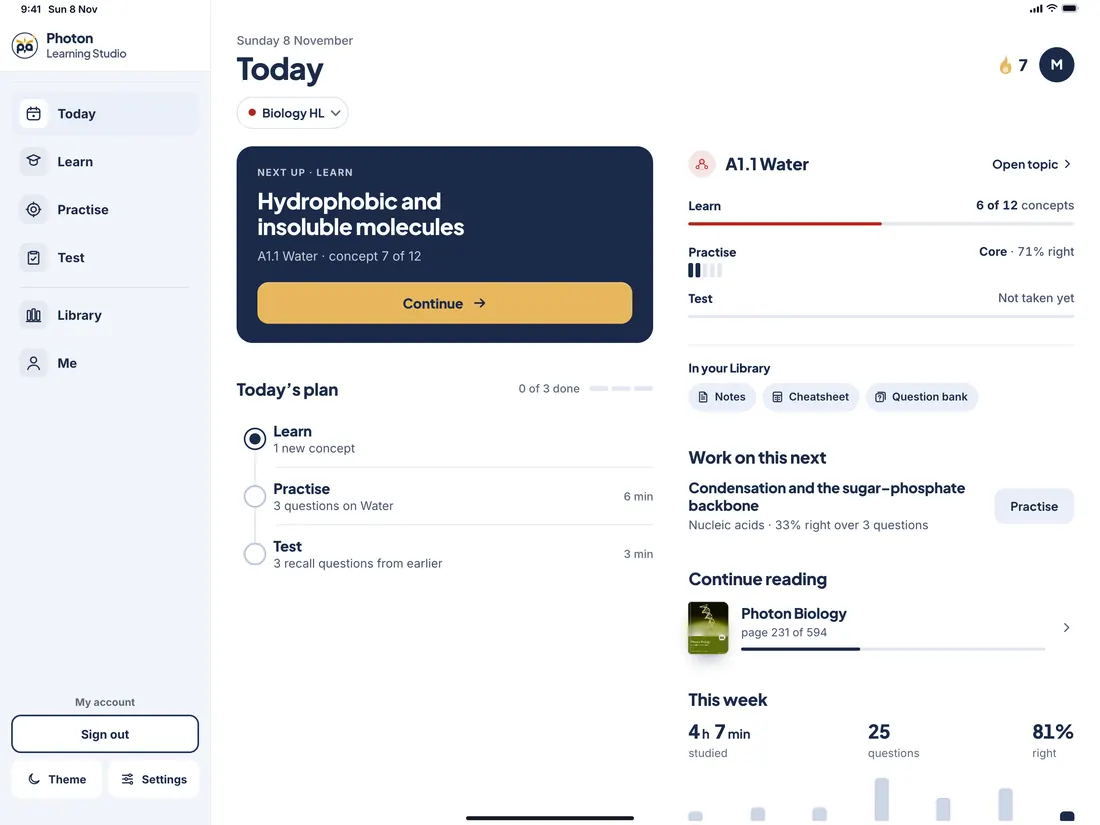
Open Photon IB and you land on Today. It answers one question: what should I do now?
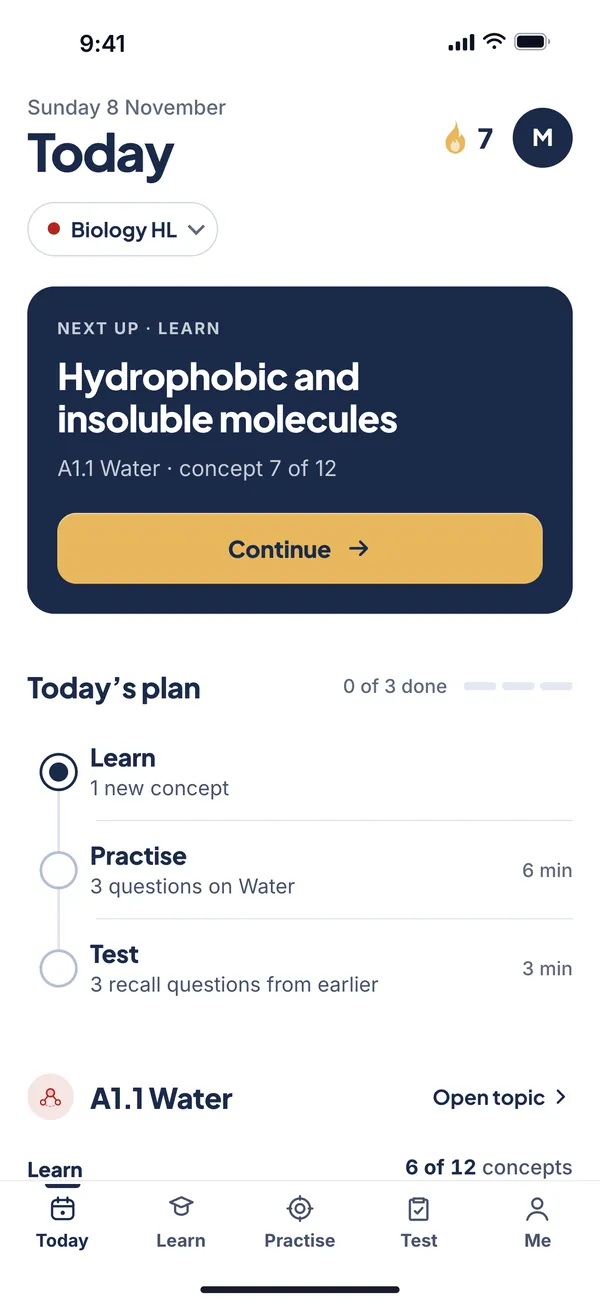 12345
- 1Streak and Me. The flame counts whole days in a row with any study. The circle opens your account and settings.
- 2Your course. Switch course or topic in one tap. The rest of the screen follows.
- 3Next up. One next step, chosen for you: the next concept to learn, then the practice, then the recall test. One gold button.
- 4Today's plan. Three steps: Learn one new concept, Practise three questions, Test with three recall questions. Minutes are shown so you can fit them into a free slot.
- 5Your topic. Concepts learned, the practice level you have reached with the percentage right, and your last test.
Setting up takes three taps. The first time you open the app it asks which course you study (five subject tiles, then HL or SL), when your exam is (the next four May and November sessions, with "about N months to go"), and which grade you are aiming for: 5, 6 or 7. It then opens the first concept of the course's first free topic. Skip any step and it picks sensible defaults.
Under the plan, Today also shows Work on this next (the concept where you have scored lowest, if it is under 75% over at least two questions), This week (a bar for each day from Monday to Sunday, with minutes studied, questions answered and percentage right), and a short list of your other topics. If you have e-books, a Continue reading row takes you back to your page. You can also switch on a daily practice reminder; the app asks permission first.
Learn: short lessons with diagrams that move
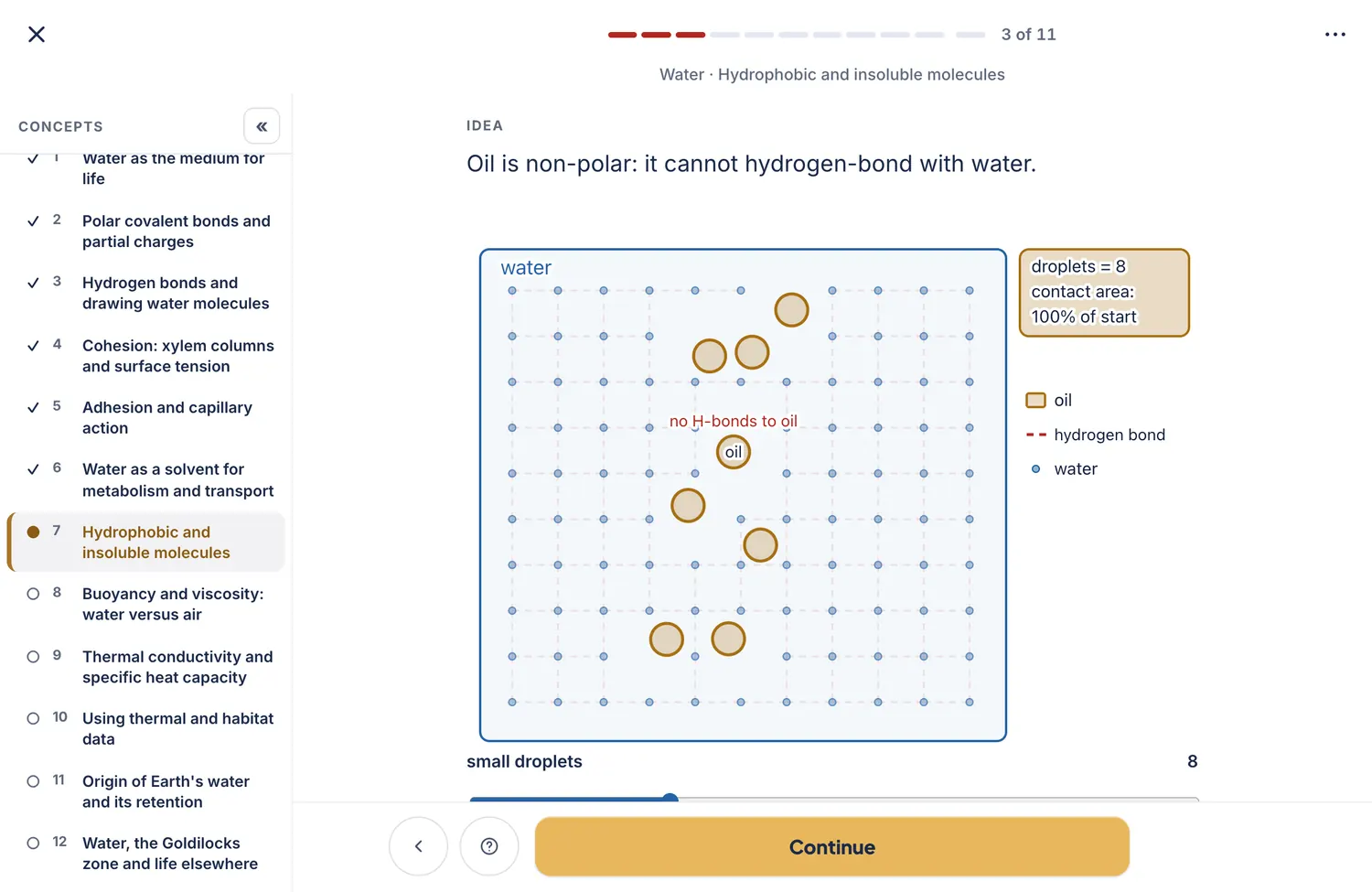
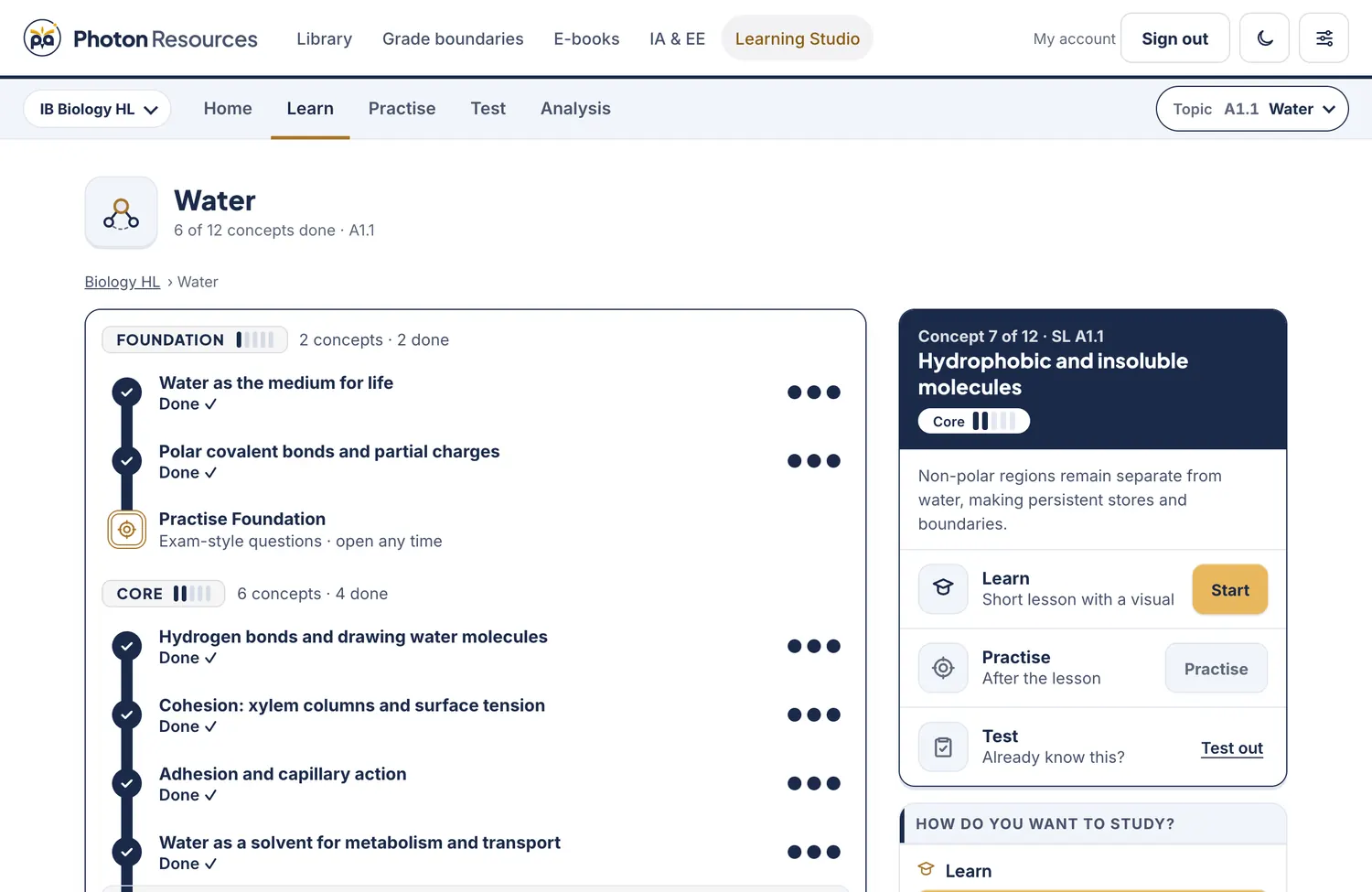
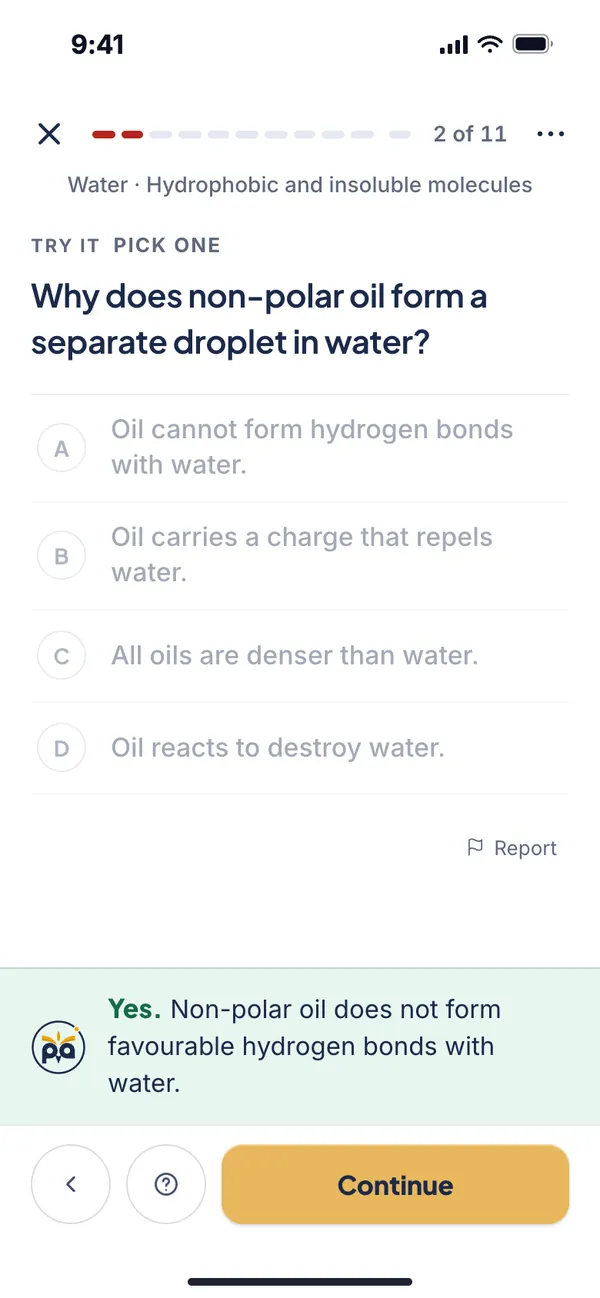
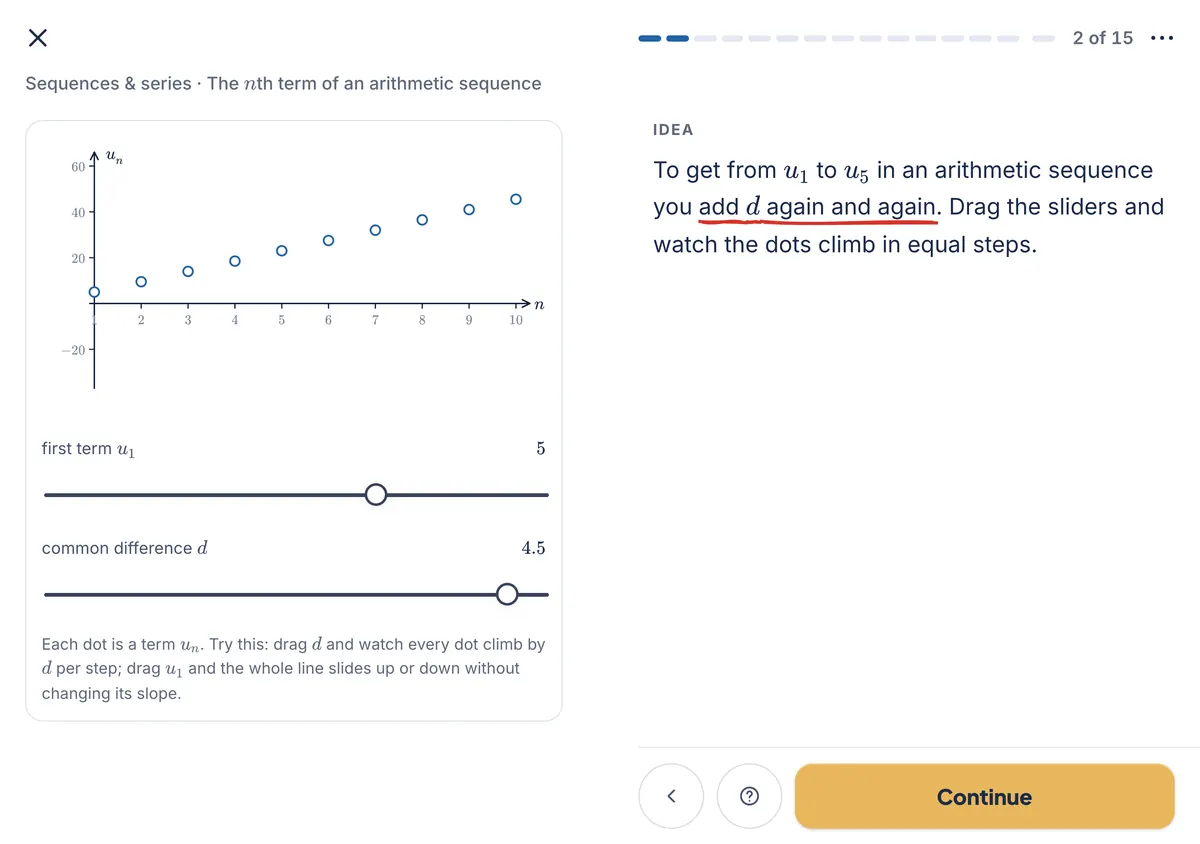
A concept is one small idea: Hydrophobic and insoluble molecules in Biology, or The nth term of an arithmetic sequence in Maths. Its lesson is a handful of steps, one idea per step, with the key words underlined the way a teacher would underline them. Each concept has a picture that moves or responds. Drag a slider and watch the dots of a sequence climb. Split an oil droplet into smaller ones and watch what happens to its contact area with water.
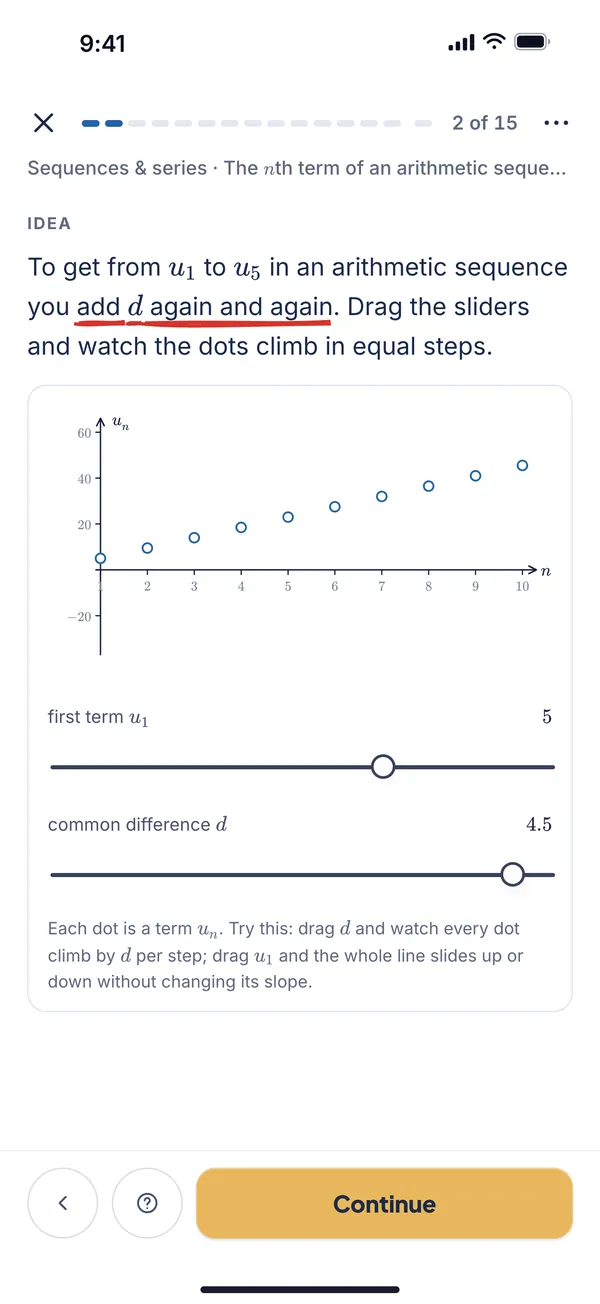
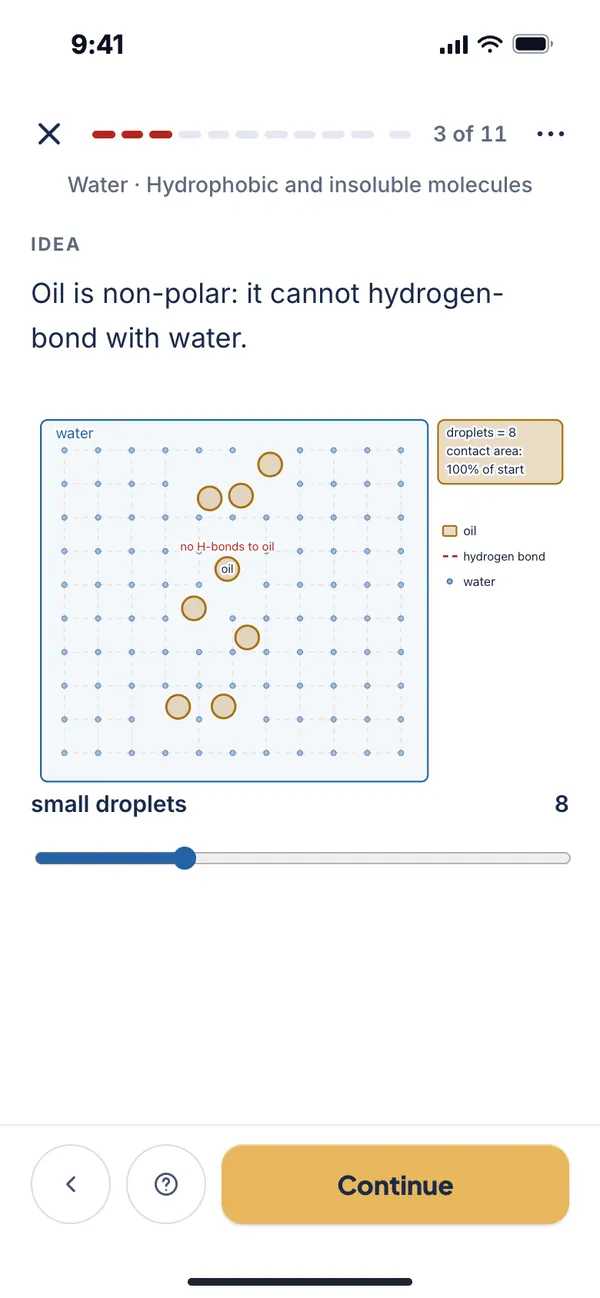
After each idea comes a quick check: pick one, spot the mistake, fill the blank, type a value, true or false, put the steps in order, or match. If you get one wrong, the app explains the idea another way and asks again, instead of just showing the answer. If you are stuck, four buttons help: Explain another way, Show me a picture, Give me an example and Why?. If you already know a concept, I know this: test out gives you two questions to skip it.
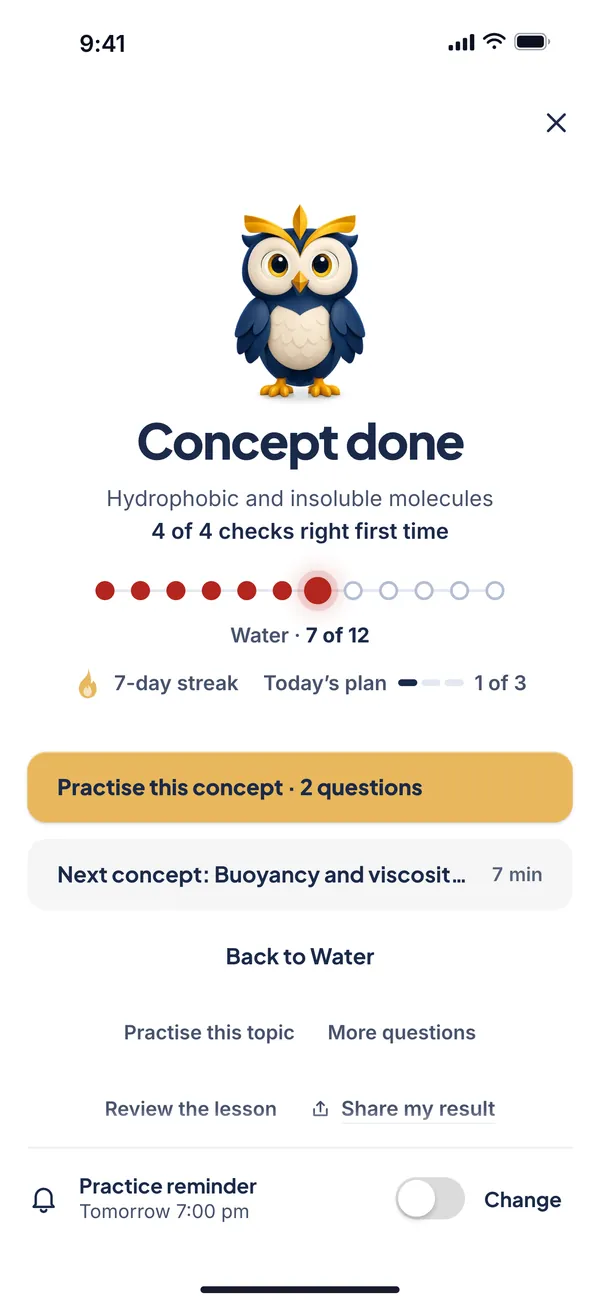
A concept is Done when you answer concept questions right three times in a row without help. A wrong answer or a hint resets the run, and after a miss the next question is a similar one with new numbers. If eight answers go by without reaching Done, the app says "let's come back to this" and points you to the idea it builds on. Finish a concept and you see the Concept done screen: your result, your streak, and buttons to practise that concept (two questions) or move to the next one.
Answers are checked the way a teacher would check them. Maths is typed on a keypad with a live preview, and the marker accepts equivalent forms and tells you when you have the right value in the wrong form, for example a decimal when the question asked for an exact answer. Science answers are marked with units and significant figures where the question asks for them.
Practise: exam-style questions, marked step by step
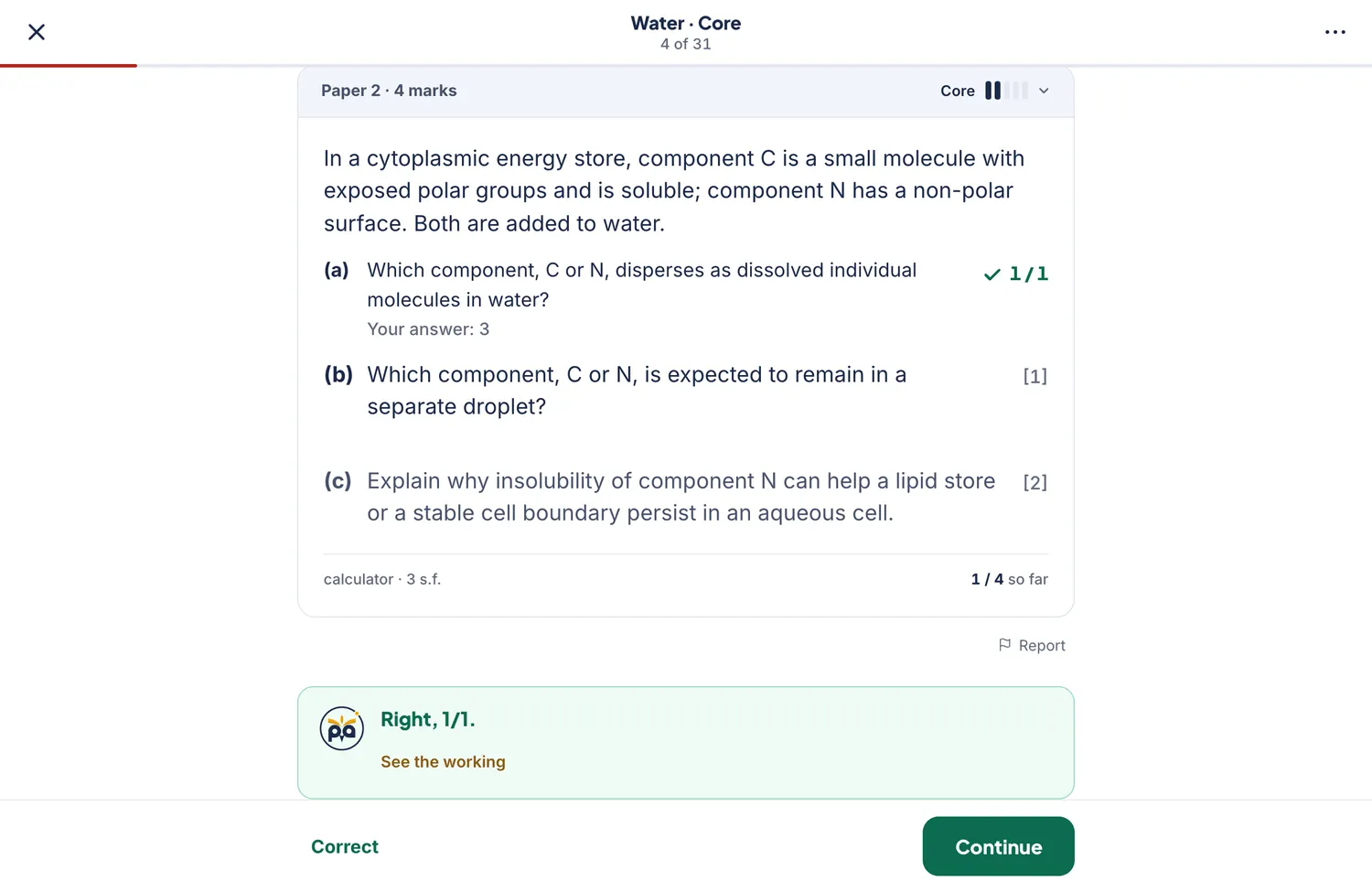
Practice is where many apps stop. In Photon IB it is the middle of the loop, not the whole of it. Questions are written in the style of the exam, with parts, marks in brackets, a paper label (Paper 1 or Paper 2) and a note when a calculator or a number of significant figures matters.
Five levels. Questions climb from Foundation to Core, Exam and Challenge, and a fifth level, Stretch, goes beyond the exam for students who want more. You reach a level after four questions at 70% or more, and the app remembers where you stopped. If you get five right in a row it offers to move you up; if you struggle it suggests going back to the lesson.
- FoundationOne idea at a time, with the method clear.
- CoreStandard method in one or two steps.
- ExamMulti-part questions in the style of the papers.
- ChallengeThe hardest in-exam questions: unfamiliar set-ups, longer reasoning.
- StretchBeyond the exam. Open any time, best after Challenge.
A level counts as reached after 4 questions at 70% or more.
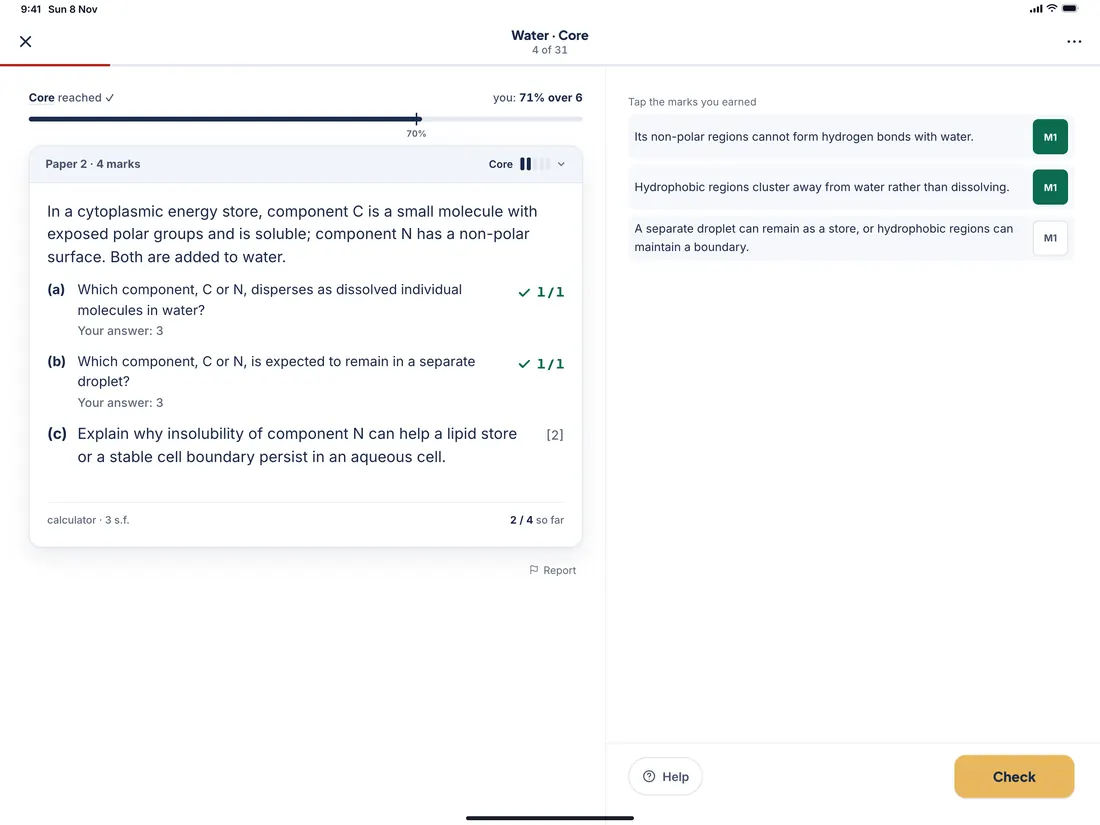
Marked part by part. Each part shows its marks. If an early part is wrong, later parts that depend on it are marked using your own answer ("Marked using your answer to (a)"), which is how follow-through works in the exam. You can ask for a hint, or tap Show me to see the working; either way the app records that you needed help, so your results stay honest.
Written answers, marked by mark-scheme steps. For explain and describe questions, you answer on paper, tap "I've finished", and the mark scheme appears as separate steps (M1, A1 and so on). You tick the marks you earned and the total updates. Reading a mark scheme as a list of marks to win is one of the most useful exam habits there is, and our guide to M1, A1, R1, FT and AG marks explains the codes.
Similar question. After a question you can ask for a similar one: the same idea with new numbers. Report. Every question has a Report button, so a student who spots a slip can tell us without leaving the question.
Test and daily recall: how ideas stay in your head
Two kinds of test sit behind the Test tab.
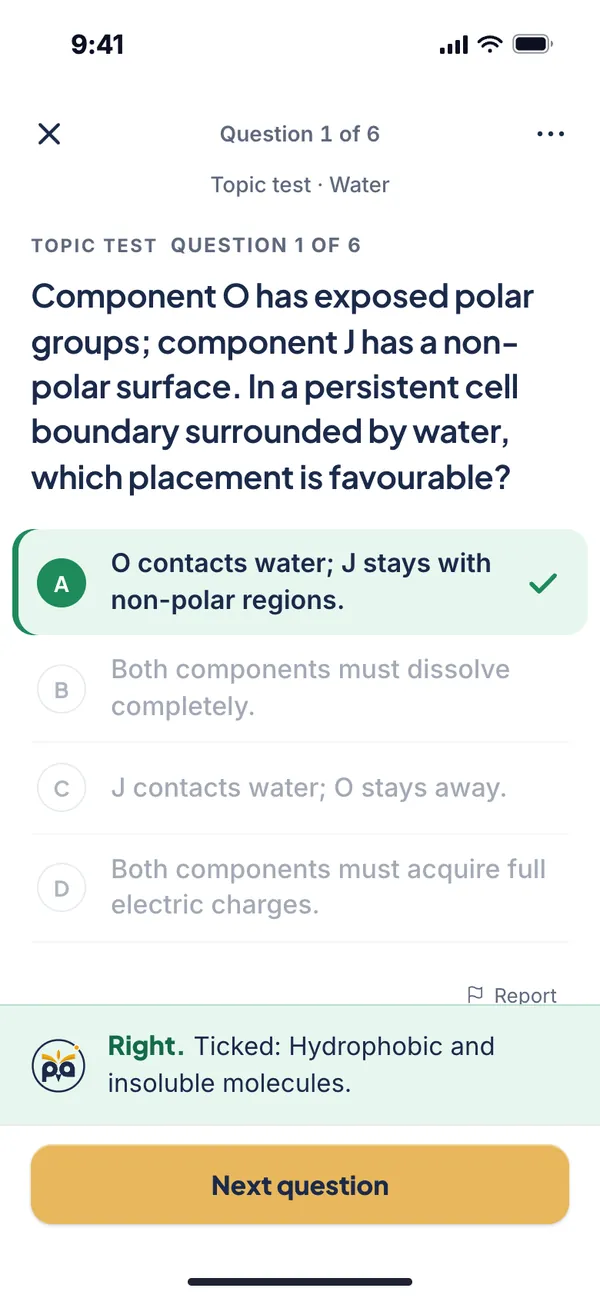
- Topic test. One question for each of up to eight concepts you have not finished, from easy to hard. Get one right and that concept is ticked off, so a student who already knows half a topic can skip it.
- Daily recall. Three questions a day, each from a different concept you finished about two to seven days earlier. You get the same three all day, and one run a day. It opens once you have finished three concepts. A right answer keeps the concept fresh; a miss gives you a "Learn it again" link.
We built recall in because the research is consistent on two points. Trying to remember something beats rereading it (Roediger and Karpicke, 2006), and spreading practice over days beats packing it into one session (Cepeda and colleagues, 2006). A large review of study techniques by Dunlosky and colleagues (2013) rated practice testing and distributed practice among the most useful, and rereading and highlighting among the least. Our guide to IB past papers applies the same idea to full papers.
My Library: e-books, notes, cheatsheets and the question bank
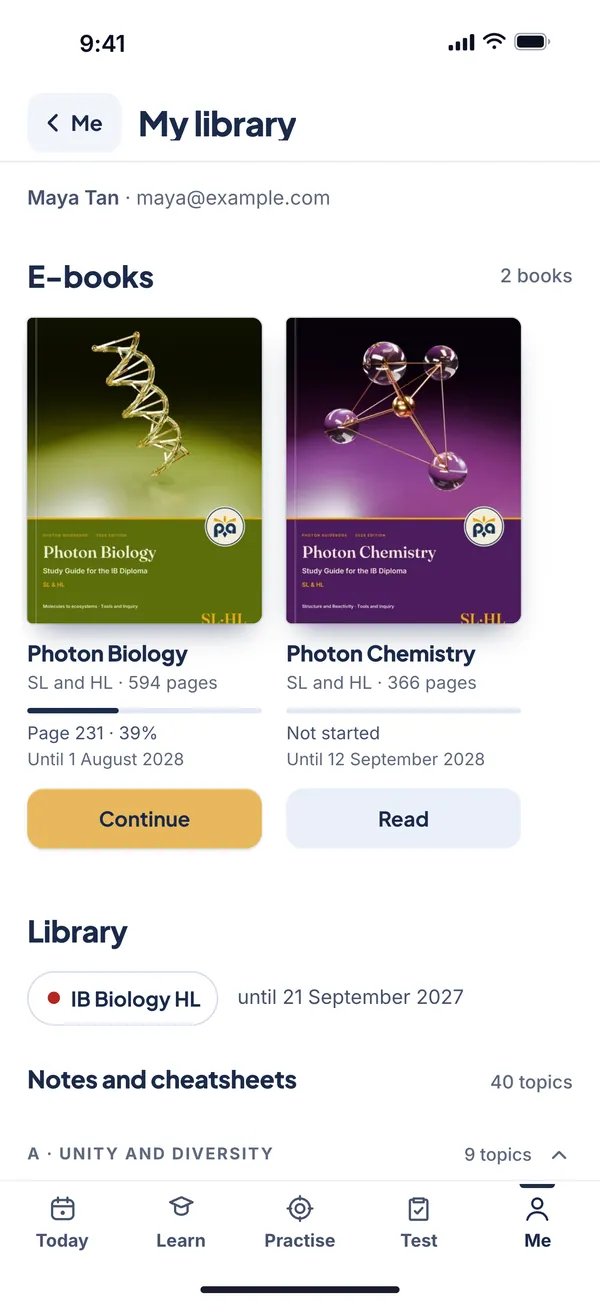
The course gives you lessons, practice and tests. The Library, an optional extra, adds reading material and a deeper bank of questions. Everything you own appears under Me, then My library.
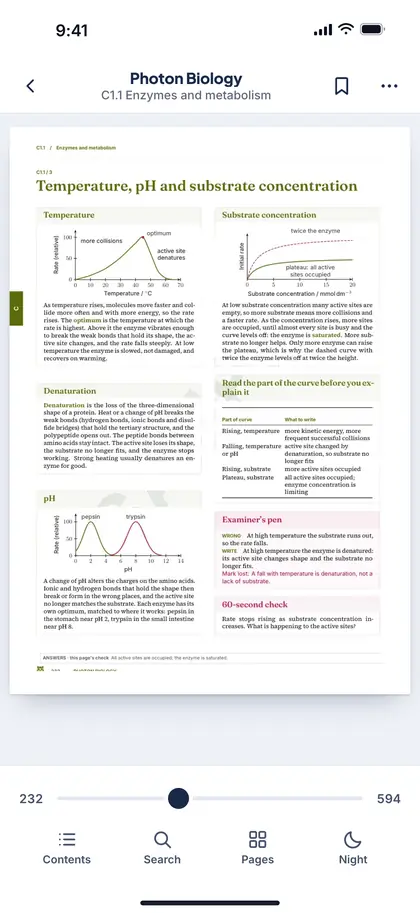
- E-books. The Photon e-books for your subject, in a reader with a contents page, search by chapter or page number, page thumbnails, bookmarks, night mode and double-tap zoom. The app remembers your page, and Today shows a Continue reading row.
- Notes and cheatsheets. Notes and cheatsheets for each topic, in a viewer inside the app. The cheatsheets are also free on the website: see the IB cheatsheets.
- The question bank. More questions for each topic in four levels, for Paper 1 and Paper 2, with ticks for what you have done. Open a level and it starts in Practise. The website's practice library has the same bank in a browser.
- End dates. Each item shows how long you have it, so there are no surprises.
The Library is a separate purchase from the course: see free or paid, or the premium library page. If you bought on the website, sign in with the same email and everything is already there.
iPad and iPhone Duo: the same app, laid out for a bigger screen
On iPad held upright, Photon IB keeps its bottom tabs. Held sideways, it moves them into a sidebar and gives each screen two columns. In Practise the question sits on the left, and your answer, the marks and the mark scheme sit on the right, so you never scroll back and forth between them.
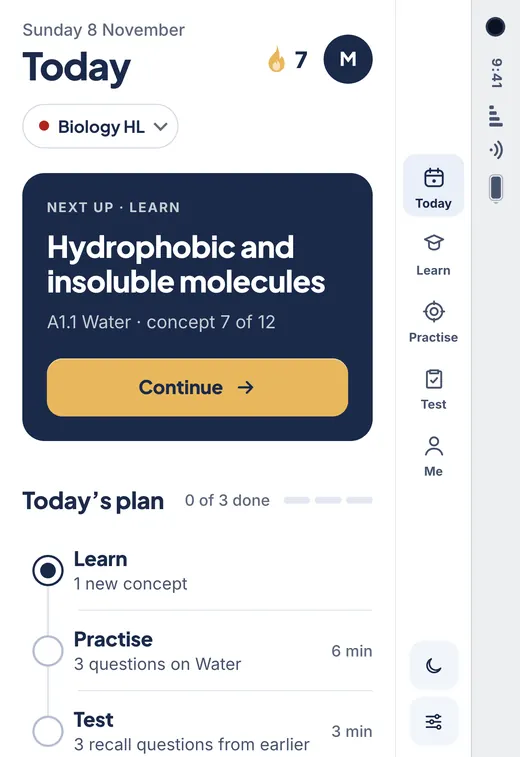
The app also detects iPhone Duo. Closed, it is a phone with the tabs down the side. Opened and held like a book, each lesson step is split across two pages, the diagram on the left and the text and questions on the right, and the e-book reader keeps its contents on the left page and the book on the right.
The iPad and Duo screens are the app's own layouts, rendered at those screen sizes.
How students benefit
Features matter only if they change what a student does on a Tuesday evening. Here is what each part of the app is meant to change.
- You always know what to do next. The Next up button removes the "what should I revise?" decision, which is where many study sessions stall.
- You learn before you are tested. Lesson, check and then question follow in order, so practice starts from understanding, not guessing.
- You practise the way the exam marks. Parts, marks, follow-through and mark-scheme steps train method as well as answers.
- You find gaps early. Weakest subtopics and mistakes to review show a weak spot after a handful of questions, not after a mock exam.
- You remember what you learned. Daily recall brings a concept back a few days later, when forgetting has begun and a short question does the most good.
- You can work in short bursts. A lesson, three practice questions and a recall test make a short session, and the plan shows the minutes for each step.
- You skip what you know. "Test out" and the topic test let you tick off concepts you already understand and spend the time on the rest.
- You have your notes with you. With the Library, the e-book, notes and cheatsheet for a topic are a tap from its lesson.
- You start with your own plan. The set-up asks for your course, your exam session and the grade you are aiming for.
None of this replaces a teacher, and it does not need to. It covers the parts of revision that are the same for every student, such as remembering to come back and practising with feedback, so that class time and your own thinking can go to the parts that are not.
How students, parents and teachers can analyse progress
Progress in Photon IB is not a single score. The app saves every answer you give, with its marks and the time it took, and builds a Progress page from them: "built from every answer you have saved", as the page itself says. On iPhone and iPad it is under Me, then My progress. In a browser it is the Analysis tab. Because it is saved to your account, it is the same on your phone, your iPad and your laptop.
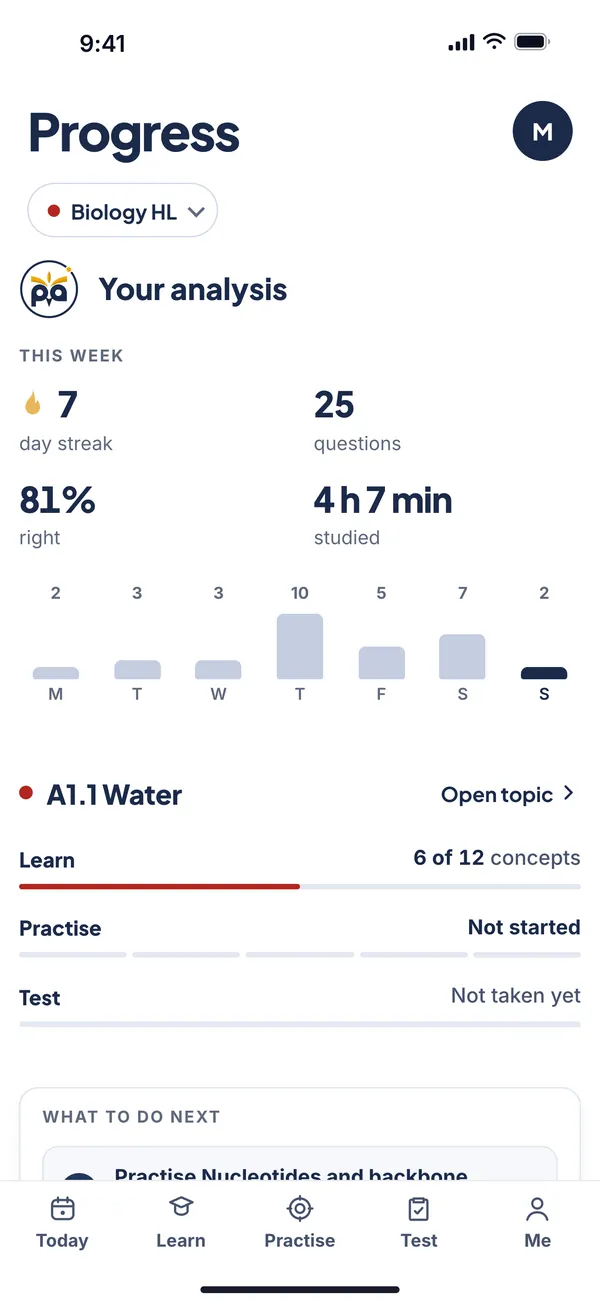 123
- 1This week. Streak, questions answered, percentage of marks right and time studied, with a bar for each day from Monday to Sunday. Habit, at a glance.
- 2Your current topic. Three rails: concepts learned, the practice level reached with its percentage right, and your last test.
- 3What to do next. One to three actions picked from your data: finish a half-done concept, practise your weakest subtopic, retake a test below 60%, or start the next topic.
Scroll down and the same page shows the whole course: questions done, percentage of marks right, concepts done, the best level reached, and a table of every topic with its Learn, Practise and Test results and a button for the sensible next step. Here it is in a browser.
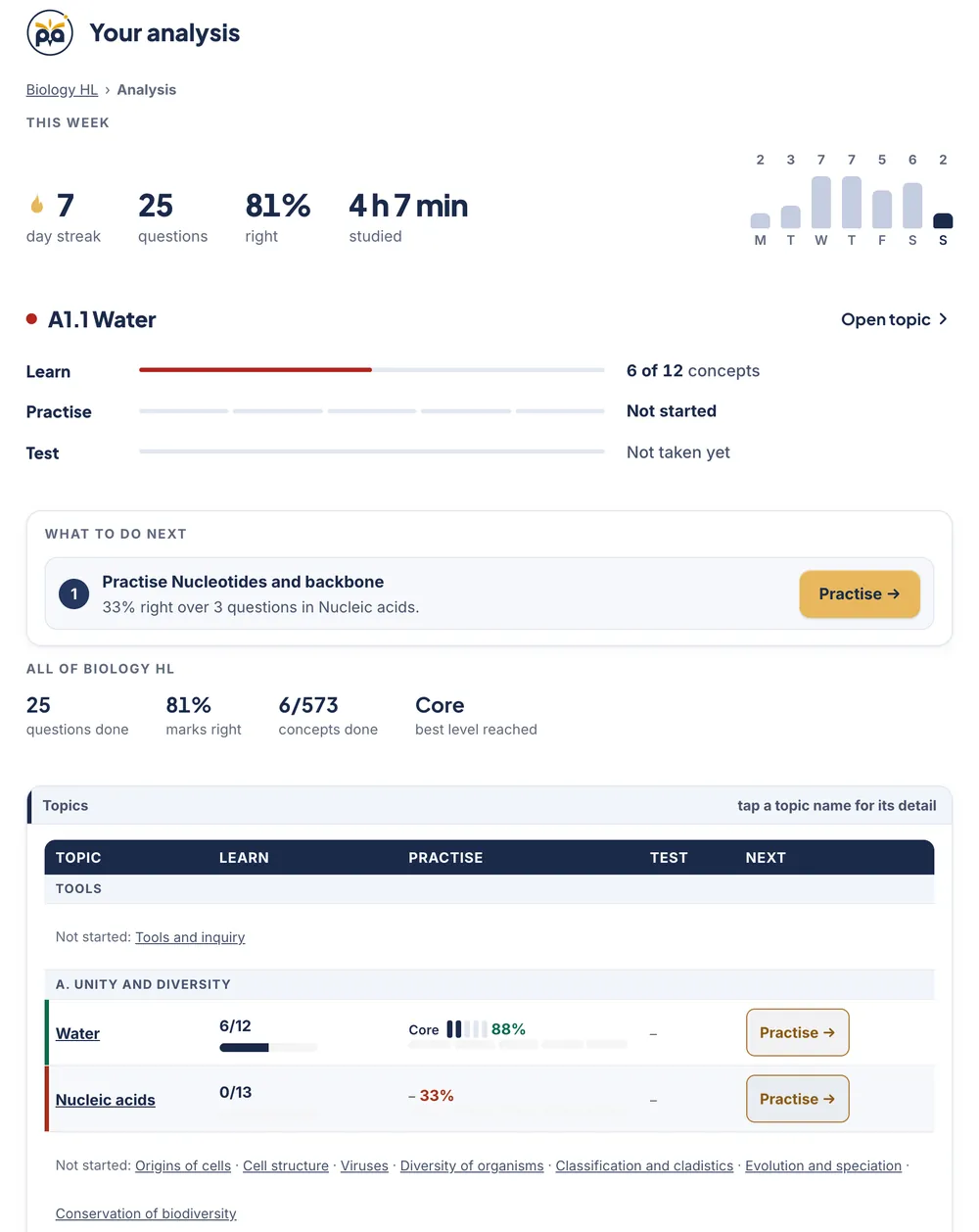 12345
- 1This week. The same streak, questions, accuracy and minutes, with the daily bars on the right.
- 2Your current topic. Learn, Practise and Test as three rails, with a link to open the topic.
- 3What to do next. The action with the biggest payoff, with a button that starts it.
- 4All of the course. Questions done, percentage of marks right, concepts done and the best level reached.
- 5Every topic in a table. Learn, Practise and Test for each one, topics you have not started listed underneath, and a Next button that picks the sensible step.
Tap a topic name and you get that topic in detail.
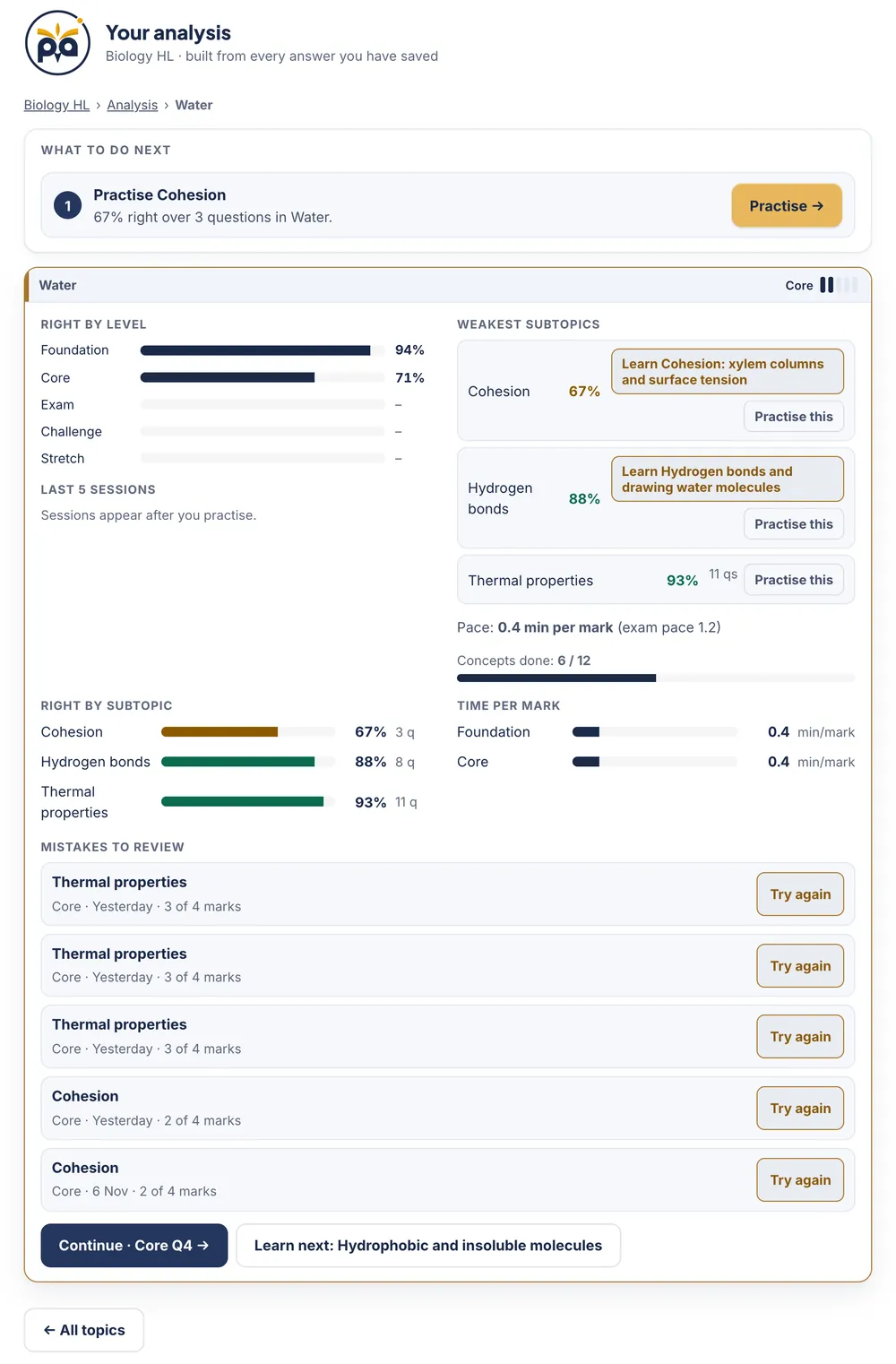 1234567
- 1What to do next, for this topic. "Practise Cohesion: 67% right over 3 questions." The button starts that practice.
- 2Right by level. Your percentage at each of the five levels. It shows where you are strong and where you stall.
- 3Weakest subtopics. Lowest first, each with a Learn button for the concept behind it and a Practise this button. A subtopic needs at least three questions to appear.
- 4Pace. Your minutes per mark against the app's own exam pace of 1.2. It is the app's benchmark, not an IB figure, but a pace far above it is a warning about time.
- 5Right by subtopic. Every subtopic with its percentage and the number of questions behind it, so a 100% from two questions is not mistaken for mastery.
- 6Time per mark. The same pace, level by level.
- 7Mistakes to review. Your latest wrong answers with level, date and marks, and a Try again button on each. The page also keeps your last five practice sessions as bars, so you can see the trend.
One page, three readers. There is no separate parent or teacher login: progress belongs to the student's own account, which keeps a student's data theirs. The practical way to read it is together, on the student's phone, iPad or laptop, for five minutes a week.
Students
A five-minute weekly review
- Look at This week: did you study on the days you planned?
- Open What to do next and do the first item.
- Open your weakest subtopic and tap Practise this.
- In Mistakes to review, tap Try again on three of them.
Ask yourself: what is the one thing I will fix before next Sunday?
Parents
No need to know the subject
- Look at the streak and minutes for habit, and percentage right over several days for direction, never one day's score.
- Compare Test with Practise: a good practice level but a weak test can mean the idea has not stuck yet.
- Read What to do next aloud together.
Ask: which subtopic is weakest, and what are you doing about it? After a concept or a topic test, Share my result sends a one-line result through the iPhone share sheet.
Teachers and tutors
Choose the next lesson from data
- Ask the student to bring the Progress page, or share their screen.
- Right by level shows whether a student is stuck at Core or ready for Exam.
- Weakest subtopics and Mistakes to review point to what to teach next, and time per mark shows time management.
Try: ask the student to explain one mistake aloud before they retry it.
This is how we suggest using it, and it echoes advice we give in our revision plan: the marks students lose most often are ones they could have won, and a short weekly habit finds them. If your child or student studies with us, signing in with the email on their Photon Academy account opens their subjects in the app.
Photon Students is Photon Academy's iPhone and iPad app for its own students: work set by their teachers with due dates, and hand-ins by camera scan or PDF. It is a separate app from Photon IB, and it is on the App Store.
Free or paid? What you get in each
Photon IB is free to download. What you unlock depends on what you choose.
| Free | Course | Course + Library | |
|---|---|---|---|
| Which topics | Two topics in every course | Every topic in one course | Every topic in one course |
| Lessons, practice, tests, daily recall and Progress | Yes, for the free topics | Yes | Yes |
| E-books, notes and cheatsheets in My library | No | No | Yes |
| The question bank by topic (four levels, Paper 1 and 2) | No | No | Yes |
| How long | No limit | 12 months, one payment, no renewal | 12 months, one payment, no renewal |
| Price on the website | Free | S$100 per course | S$350 per course |
The free topics. Maths AA: Sequences & series, and Exponentials & logarithms. Maths AI: Sequences & series, and Exponents & logarithms. Physics: A.1 Kinematics and A.2 Forces and momentum. Chemistry: S1.1 Introduction to the particulate nature of matter and S1.2 The nuclear atom. Biology: A1.1 Water and A1.2 Nucleic acids. The same two topics are free at HL and SL. On the website they open without an account, and the cheatsheets are free too.
The prices above are the website's. In the iPhone app the price is shown by Apple, in your currency, before you confirm, and the unlock sheet says "12 months, one payment, no renewal". If you bought on the website, sign in with the same email and your course, Library, e-books and progress are already in the app. Photon Academy students open their subjects with the email on their account. Prices and what each plan includes are always on the Learning Studio page.
Why our questions and worksheets stand out
We think the questions are among the best available for IB revision, and better than most you will find elsewhere. You should not take that on trust, so here are the reasons, each one something you can check.
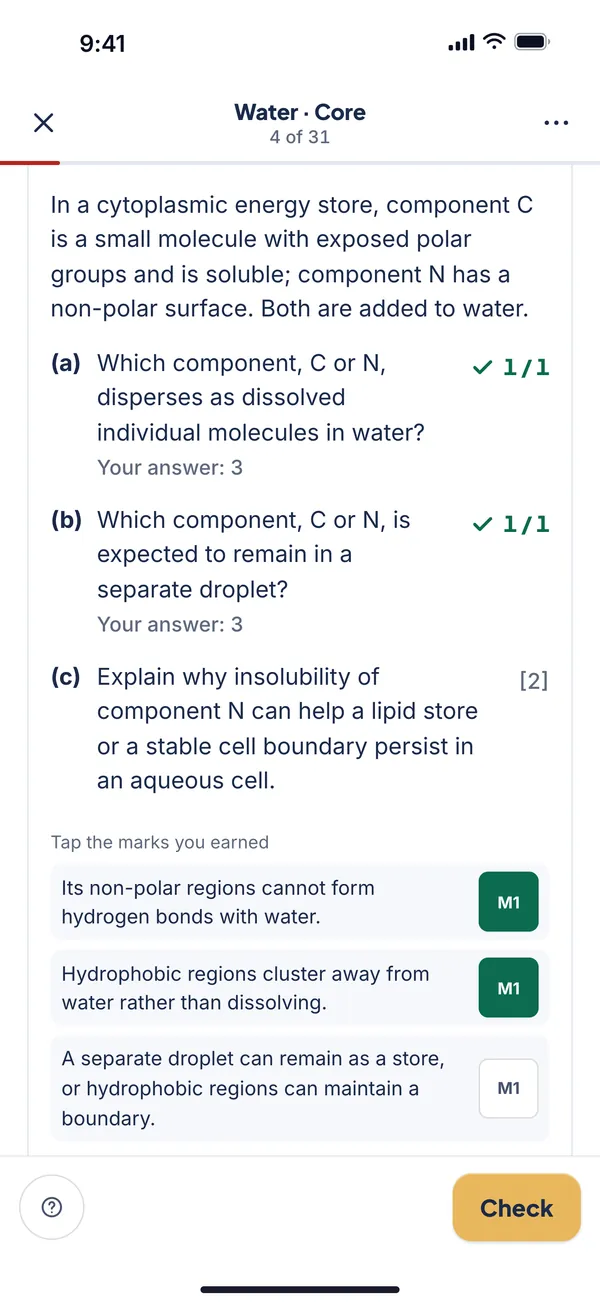 1234
- 1Parts and marks like the paper. Every part carries its marks in brackets, and the question is labelled by paper.
- 2Marked as you go. A part you can type is marked at once, with equivalent forms accepted.
- 3A mark scheme in steps. For written answers the scheme is split into separate marks you can see.
- 4Tick what you earned. The M1 chips are tappable, so the total is yours to check, the way a teacher would mark it.
- Written by people who teach the courseMr Ejaz has taught the IB Diploma since 2015 and is IB-certified for Maths AA HL and Physics HL. With the Photon Academy team he has taught more than 1,000 IB students. The same team writes the Photon Guidebooks, where every question and worked solution is original.
- Original, not copiedWe never reproduce IB papers, mark schemes, subject guides or booklets. Our questions are written in the style of the exam, so you practise the skill without borrowing the paper.
- Marked the way the exam is markedPart-by-part marks, follow-through from earlier parts, calculator and significant-figure notes, and mark-scheme steps for written answers.
- Easy to hard, on both papersFive levels, so there is always a question at the right difficulty, from the first idea to beyond the exam.
- Tested with real studentsWe test questions with real students before they are published.
- Open about what the exam rewardsThe team behind the app also publishes how it analyses every IB paper since 2021, by the marks each topic and question type has carried, so you can see the evidence. The method is public.
- A quality loopLessons and question templates pass automated checks of answers and mark steps before release, and our teachers review them. If a slip still gets through, every question has a Report button and the reports go to our team.
We cannot promise a grade, and no app honestly can. What we can offer is questions built by teachers, marked like the exam, and a way to see for yourself. Run the ten-minute test on the free topics, and compare. To go deeper on how the exam is marked, see our guides to IB command terms and how grade boundaries work.
Photon IB for IB Maths, Physics, Chemistry and Biology
The app is the same in every subject, but each subject gets what it needs. Each link below goes to that course's page on this site.
IB Maths app: AA and AI
Type answers on a maths keypad with a live preview. Graphs and sliders show functions, sequences and distributions moving, and Paper 1 and Paper 2 labels remind you when a calculator is allowed.
Maths AA HL · Maths AA SL · Maths AI HL · Maths AI SL
Next: the GDC guide.
IB Physics app
Interactive diagrams across the topics, and answers marked with units and significant figures where the question asks for them.
Next: uncertainties in IB Physics and the data booklet guide.
IB Chemistry app
Answers such as chemical formulas, equations and electron configurations are marked, alongside calculations, and diagrams show structures and reactions.
Next: IB Chemistry notes by topic.
IB Biology app
Genetics ratios, magnification and base-pair sequences are marked automatically, with diagrams of cells, molecules and ecosystems.
Next: IB Biology notes by theme.
Get started in ten minutes
- Get the app, or open the browser versionSearch the App Store for Photon: IB Learning Studio, or use the button below. In a browser, open Learning Studio.
- Set up in three tapsChoose your course, your exam session and your target grade.
- Do your first free conceptThe app opens it for you. It takes a few minutes.
- Come back tomorrowDo Today's plan. After three finished concepts the daily recall opens.
IB learning app: common questions
What is the best IB revision app?
The best IB revision app is the one that matches how you revise: a plan for the day, lessons before questions, exam-style marking, recall spread over days, and a progress screen that says what to do next. Photon IB was built around those, and you can test it on two free topics in every course. Use the eight questions above on any app you compare.
Is Photon IB free?
It is free to download, and two topics in every course are free, with lessons, practice, tests and your own Progress page. A full course unlocks for 12 months with one payment and no renewal, and you can add the Library for e-books, notes, cheatsheets and the question bank.
Which IB subjects and levels does the app cover?
Maths AA HL and SL, Maths AI HL and SL, Physics HL and SL, Chemistry HL and SL, and Biology HL and SL: ten courses, each following the current IB guide for that subject and level. See the course pages for Maths AA HL, Physics HL, Chemistry HL and Biology HL.
Does the app include IB past papers?
No. We do not reproduce IB papers or mark schemes. The app has original questions written in the style of the exam. To practise with the real papers your school provides, see our guide to using IB past papers, which covers when to start, how to time and mark them, and how to keep an error log.
How does the marking work, and do I get method marks?
Questions are marked part by part. Typed answers are checked automatically, with equivalent forms accepted. Written answers are marked against a mark scheme split into steps, such as M1 and A1, which you tick. When a later part depends on an earlier one, it is marked using your own earlier answer, which is how follow-through works in the exam.
Does it work on iPad, Android and computers?
The App Store version is for iPhone and iPad, with layouts for iPad and iPhone Duo. On Android phones and on any computer, use the browser version at photonresources.com/learning-studio/app/. It is the same course and the same account.
Can my parents see my progress?
Progress belongs to your own account, so there is no separate parent login. The easiest way is to open the Progress page together once a week: it shows your streak, minutes studied, accuracy, weakest subtopics and mistakes to review. After a concept or a topic test, Share my result sends a one-line result through the iPhone share sheet.
Can teachers and tutors use it with their students?
Yes. Ask a student to bring their Progress page to a lesson, or share their screen, and use Right by level, Weakest subtopics and Mistakes to review to decide what to teach next. For whole classes in schools we have a different product, Worksheet Studio.
I bought a course on the website. Do I pay again in the app?
No. Sign in to the app with the same email and your courses, Library, e-books and progress appear. They are the same on the website and in the iPhone and iPad app.
How long does a course last, and does it renew?
A course lasts 12 months from purchase, with one payment and no renewal. The unlock sheet in the app says so before you buy, and each item in My library shows its end date.
What if I find a mistake in a question?
Tap Report on the question. Every lesson check and every practice question has a Report button, and the reports go to our team.
Will Photon IB get me a 7?
No app can promise a grade. Photon IB gives you a plan, practice marked like the exam, spaced recall and a clear view of your gaps, which are the parts of revision an app can improve. To set a target, read how IB grade boundaries work and try the IB grade calculator.
Who made Photon IB?
The IB-certified teachers of Photon Academy, led by Mr Ejaz (Ejaz Ahmad), who has taught the IB Diploma since 2015 and has taught more than 1,000 IB students. Read more on the author page.
Free to start
Try two topics in your course
Every course has two free topics with lessons, practice, tests and your own Progress page. Open one in the app or in your browser, run the ten-minute test, and see whether it teaches the way you want to learn.
Keep reading
- An IB revision plan that works topic by topic, level by level
- IB past papers: how to use them to raise your grade
- IB Maths marks explained: M1, A1, R1, FT and AG
- IB command terms: what each one asks you to do
- How IB grade boundaries work and what a 7 really takes
- IB past paper analysis and the IB grade calculator
Photon Resources is independent of the International Baccalaureate Organization. For the official programme, see the IB Diploma Programme page.
Photon Learning Studio is on the App Store for iPhone and iPad. Get the app